When it comes to gaming, having the perfect controls can mean a matter of life and death (literally). If you’re into first person shooting games or MMORPGs, the de facto input the device is of course a gaming keyboard and mouse. However, for certain games, a dedicated gamepad is the best option especially if you don’t want to break your keyboard whenever you get a little excited when playing games.


If you’re on a tight budget and you’re looking for a robust gamepad to get your game to a higher level, you might want to check out Logitech’s F310. I got myself the F310 just before the holidays and have been using it for a couple of months now.

In case you’re on the hunt for a new gamepad, read on this review and check if the Logitech F310 is the one that best suits your needs.

WHAT’S IN THE BOX

Looking at how the F310 is packaged, Logitech opted to give this gamepad a bareback packaging. The device ships in a blister pack and comes with almost nothing.


Logitech has repackaged the F310 to align its image with the company’s G-line of gaming accessories. The gamepad comes only with a couple of paper work out of the box and just like other products from the company, any drivers needed to extend the functionality of the F310 can be downloaded from Logitech’s website.

DESIGN AND CONSTRUCTION

Gamepads are practically designed to emulate the experience that one would get from a gaming console. The F310 takes this premise to heart by combining elements found on two of today’s most popular consoles – the Xbox and PlayStation.
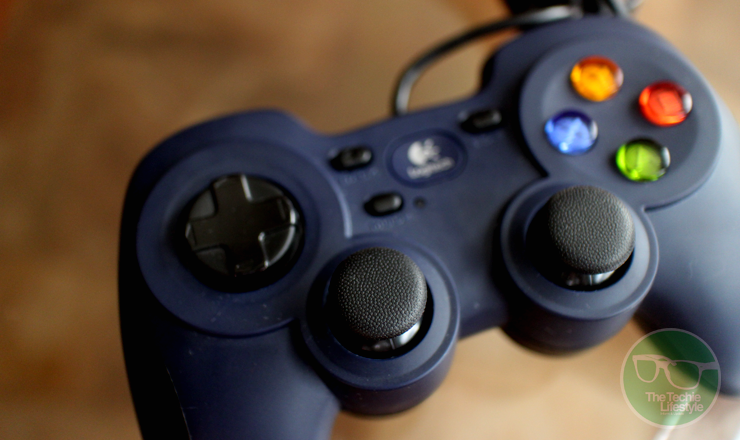

In terms of its form, the F310 resembles that of a PlayStation with these legs that provides comfortable grip to users. At the right the right side of the controller, you’ll find four action buttons (A,B,X,Y) which are reminiscent to those on the Xbox, while on the left you’ll find the 4-switch D-pad.

At the center of the device you’ll find the dual analog sticks as well as four buttons – Back, Start, Mode and a large center button bearing the Logitech logo. A single LED light is found beside the mode button.


Looking at the front of the device, you’ll find the usual shoulder and trigger buttons you’ll find in controllers from Microsoft and Sony. What’s unique with the F310 though is that when you flip the device you’ll find a small switch which allows switch form Xinput and Directinput depending on the game you’re playing.


Logitech was pretty generous when it comes to cabling as the F310’s USB cable stretches 1.8 meters.

USER EXPERIENCE

In general, the Logitech F310 fulfills what it promises to consumers. The gamepad is robust and works well with a lot of games without breaking your budget. However, it’s good to note that it does come with a few shortcomings.

For starters, unlike the controllers for the Xbox and PlayStation, there’s no unified tactile experience with the F310. What I mean is that the tactile feedback on some of the buttons are quite different from the rest of the controls of the gamepad which at times can feel weird.


A good example of this issue is with the shoulder and trigger buttons. While the shoulder buttons provide a “clicky” feedback, the trigger buttons on the F310 provide more resistance which you could either love or hate. The D-pad also feels weird, because it’s a bit loose compared to what you’ll find on other controllers. I guess this is because of the mechanism of the 4-switch D-pad.

When it comes to ease in use, the F310’s design provides for a comfortable experience even after extended use. The legs (or handles) of the device have this nice curves that follow the shape of your hands when you’re holding it.


The Logitech F310 is specifically designed for PC gamers who are fond of fighting and racing game genres. However, the F310 can also be used in other devices. In fact, Logitech’s website specifically markets this gamepad for Android TV devices.

Moreover, doing some research, you might find out that this device can also be used on the Xbox and PlayStation. Unfortunately, suing the F310 on your console isn’t as intuitive as when used on the PC. I asked my friends to test the device on their PS4s and on our office’s Xbox 360, and none of them was able to get the gamepad working.

FINAL WORDS

All in all, the Logitech F310 is a solid buy for those looking for a budget-friendly gamepad for playing fighting and racing games on their laptops or PCs.

I really like that Logitech designed the F310 after the PlayStation’s controller incorporating some of the Xbox’s flare. In general, using the gamepad is a breeze, especially on the PC where the F310 shines with its plug-and-play functionality.

On the down side, the Logitech F310 struggles in providing a unified tactile experience to the consumer as the feedback from its buttons vary widely.  The gamepad also gets demerits when it comes to cross-device compatibility as it isn’t as easy to use on other devices.


For just $25 (or around Php 1,200) is definitely something I’d recommend to users who are looking for a reliable controller from a reputable brand.

Connect with The Techie Lifestyle on your favorite social networking sites

Twitter Facebook Subscribe to RSS Feeds Google Plus Follow via Email

Nintendo’s highly successful handheld gaming console is getting a refresh this year. Known simply as the “new” 3DS and 3DS XL, the two consoles are now equipped with NFC and features a remapped button set.
The new models now come with two analog sticks, two new shoulder buttons – the ZR and ZL buttons right beside the current L and R buttons. There’s also a new CPU that should allow for better downloads and faster connection to the company’s eShop.

Nintendo is also now adding a microSD card reader at the base panel and its cartridge slot has been moved to the front. Moreover, the new consoles now support custom covers in case you want to make your 3DS more unique and personal.

The new 3DS models will be available starting October 11 initially in Japan. Availability in other markets will be announced shortly.

Connect with The Techie Lifestyle on your favorite social networking sites

Twitter Facebook Pinterest Subscribe to RSS Feeds Google Plus Follow via Email

Asus’ Republic of Gamers brand of simply known as ROG has always been a major part of Computex. Last year, the brand released several products including the Maximus VI Formula motherboard, the Poseidon Graphics card and a couple of Tytan laptops.

This year, the company announced even more products, which includes a 4K gaming laptop, two Steam machines, several motherboards and a number of gaming PC accessories.


Leading the charge of announcements is the GX500. The laptop is based on the Asus NX500 laptop and packs a 15.6-inch 4K IPS display that can show 100 percent of the NTSC colour gamut. It also comes with Asus’s VisualMaster technology, an Intel Core i7 CPU and an Nvidia GeForce 860M graphics chip.

The laptop has a very thin profile at just 0.75 inches thin and weighs just 4.9 pounds, making it one of the slimmest gaming laptops in the market rivalling that of Razer’s Blade, Maingear’s Pulse 17 and MSI’s GS70.


Thanks to its Nvidia graphics card, the GX500 boasts cool and nifty features that would make any gamer happy including automatic game optimization, ShadowPlay and the ability to automatically record segments of a game so users can later share them on their social networks. It also has Nvidia’s Battery Boost technology that maximizes the laptops 6-cell battery.

The ASUS ROG GX500 is set to ship sometime in Q3 2014 for a little less than $2000.

Also on ROG’s menu at Computex are the ROG G20 gaming desktop and the ROG GR8 console gaming PC. The ROG G20 sports an Intel Core i7 processor with an Nvidia GeForce GTX 780 graphics that is housed in a 12.5-liter case, making it an ideal solution for those with big gaming needs but have small spaces.

The G20’s ventilation system takes advantage of natural convection in order to cool the entire machine. The computer’s case uses a thermal design with a hidden airflow tunnel that accounts for the G20’s efficient heat management and low operating noise. ROG and Asus has also made the gaming desktop extremely power efficient which only consumes 20W in Eco Energy mode.

ROG GR8 (Left) and ROG G20 (Right)

Design-wise the computer’s case sports a sophisticated design, Mayan stencilling and customizable lighting effects that shows up to 8 million colours across three different zones. Moreover the G20 also comes equipped with Asus’s Aegis application that helps users monitor system performance through a very gamer-friendly interface.

Then there’s the ROG GR8 console gaming PC which will support SteamOS. The machine will be powered by an Intel Core i7 processor coupled with Nvidia’s GeForce GTX 750Ti GPU. It will also have SupremeFX audio output, support for UHD graphics and Gigabit Ethernet networking.

ROG has also baked in a built-in Miracast receiver and WiDi 3.5 that allows the GR8 to mirror and stream content from supported Android smartphones and tablets as well as Windows 8.1 devices.

Connect with The Techie Lifestyle on your favorite social networking sites

Twitter Facebook Pinterest Subscribe to RSS Feeds Google Plus Follow via Email

High-performance gaming on a low-end machine isn’t something we’re used to. But recent improvements in technology, especially those involved in the manufacture of components for processors and graphics cards have now allowed mid-range and low-end machines to play better games.


For instance, the recently launched Radeon R7 265 brings twice the memory bandwidth of the R7 260x, which is roughly 25 percent better than its predecessor.

The card will be powered by a core clocked to 925MHz, 1024 stream processors and up to 2GB of RAM. The new R7 supports Direct X 11.2, Mantle tech and OpenGL 4.3. The card requires a 6-pin connector for power, and includes an HDMI, DVI and Display port connectors.

The AMD Radeon R7 625 will be available this month for $150.

Connect with The Techie Lifestyle on your favorite social networking sites

Twitter Facebook Pinterest Subscribe to RSS Feeds Google Plus Follow via Email

For the past few months, Valve’s SteamOS quite a bit of hype due to its very ambitious efforts of putting PC games in a console-like environment. For the most part, the company has already made ties with different manufacturers to build the hardware that will run the operating system. But when it comes to the development as well as testing of the apps has been made relatively exclusive to a select few.


Ever since the release of the first beta of SteamOS, only users whose machines are equipped with UEFI and users with older machines are a bit left out. This week, Valve released an update to SteamOS that allowed users with older machines to install the OS into their system. Moreover, the update will also allow users to use OS in a dual-boot configuration; and support for partitioning, recovery and DVD install.

The ISO file for the update is now available at the SteamOS community page. However, Valve has put up a disclaimer saying that this update hasn’t undergone much testing yet and cautions users to “not install the update to a machine they are not prepared to lose”.

Connect with The Techie Lifestyle on your favorite social networking sites

Twitter Facebook Pinterest Subscribe to RSS Feeds Google Plus Follow via Email

The Sony PlayStation 4 is about to ship in a few weeks and Sony is already paving the way for their latest generation console by making sure that all the necessary things are in place before the big event. One such item on Sony’s checklist is the PS Vita, which will play a big role once the PS4 hits the shelves.


Yesterday, the company has pushed an update to the PS Vita that will allow the device to connect to the PS4 for Remote Play and second screen purposes in a feature called PS4 Link. Other notable changes brought about by the update include added parental controls, a panoramic photo setting to the PS Vita options, and an improved Friends app in anticipation of the PS4’s newly expanded friends list.

The Group Messaging and Party app have also been revamped with a slightly redesigned icon, new names and new functionalities, which now allow users to send messages to smartphones via the PlayStation app and the ability to voice and text chat with other PS4 users. The PS Vita can now connect to PS3 consoles through the Content Manager app that works over Wi-Fi.

PS4 trophies can also now be viewed within the PS Vita, while system updates can now be downloaded automatically.

Connect with The Techie Lifestyle on your favorite social networking sites

Twitter Facebook Pinterest Subscribe to RSS Feeds Google Plus Follow via Email
2013-2015 © The Techie Lifestyle
Planer theme
Powered by Jasper Roberts Consulting - Widget