When it comes to gaming, having the perfect controls can mean a matter of life and death (literally). If you’re into first person shooting games or MMORPGs, the de facto input the device is of course a gaming keyboard and mouse. However, for certain games, a dedicated gamepad is the best option especially if you don’t want to break your keyboard whenever you get a little excited when playing games.


If you’re on a tight budget and you’re looking for a robust gamepad to get your game to a higher level, you might want to check out Logitech’s F310. I got myself the F310 just before the holidays and have been using it for a couple of months now.

In case you’re on the hunt for a new gamepad, read on this review and check if the Logitech F310 is the one that best suits your needs.

WHAT’S IN THE BOX

Looking at how the F310 is packaged, Logitech opted to give this gamepad a bareback packaging. The device ships in a blister pack and comes with almost nothing.


Logitech has repackaged the F310 to align its image with the company’s G-line of gaming accessories. The gamepad comes only with a couple of paper work out of the box and just like other products from the company, any drivers needed to extend the functionality of the F310 can be downloaded from Logitech’s website.

DESIGN AND CONSTRUCTION

Gamepads are practically designed to emulate the experience that one would get from a gaming console. The F310 takes this premise to heart by combining elements found on two of today’s most popular consoles – the Xbox and PlayStation.
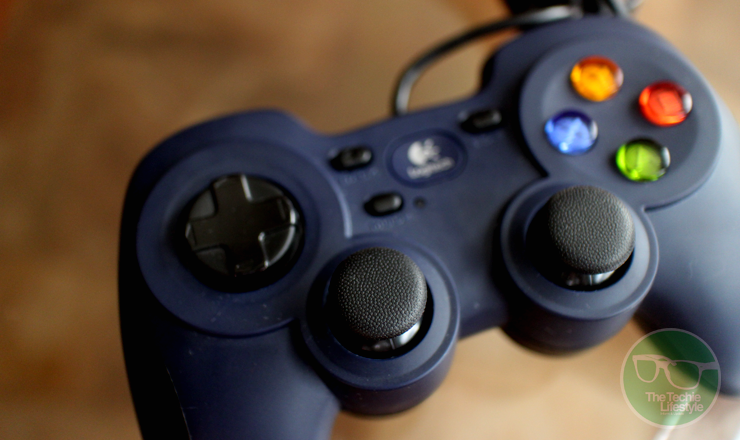

In terms of its form, the F310 resembles that of a PlayStation with these legs that provides comfortable grip to users. At the right the right side of the controller, you’ll find four action buttons (A,B,X,Y) which are reminiscent to those on the Xbox, while on the left you’ll find the 4-switch D-pad.

At the center of the device you’ll find the dual analog sticks as well as four buttons – Back, Start, Mode and a large center button bearing the Logitech logo. A single LED light is found beside the mode button.


Looking at the front of the device, you’ll find the usual shoulder and trigger buttons you’ll find in controllers from Microsoft and Sony. What’s unique with the F310 though is that when you flip the device you’ll find a small switch which allows switch form Xinput and Directinput depending on the game you’re playing.


Logitech was pretty generous when it comes to cabling as the F310’s USB cable stretches 1.8 meters.

USER EXPERIENCE

In general, the Logitech F310 fulfills what it promises to consumers. The gamepad is robust and works well with a lot of games without breaking your budget. However, it’s good to note that it does come with a few shortcomings.

For starters, unlike the controllers for the Xbox and PlayStation, there’s no unified tactile experience with the F310. What I mean is that the tactile feedback on some of the buttons are quite different from the rest of the controls of the gamepad which at times can feel weird.


A good example of this issue is with the shoulder and trigger buttons. While the shoulder buttons provide a “clicky” feedback, the trigger buttons on the F310 provide more resistance which you could either love or hate. The D-pad also feels weird, because it’s a bit loose compared to what you’ll find on other controllers. I guess this is because of the mechanism of the 4-switch D-pad.

When it comes to ease in use, the F310’s design provides for a comfortable experience even after extended use. The legs (or handles) of the device have this nice curves that follow the shape of your hands when you’re holding it.


The Logitech F310 is specifically designed for PC gamers who are fond of fighting and racing game genres. However, the F310 can also be used in other devices. In fact, Logitech’s website specifically markets this gamepad for Android TV devices.

Moreover, doing some research, you might find out that this device can also be used on the Xbox and PlayStation. Unfortunately, suing the F310 on your console isn’t as intuitive as when used on the PC. I asked my friends to test the device on their PS4s and on our office’s Xbox 360, and none of them was able to get the gamepad working.

FINAL WORDS

All in all, the Logitech F310 is a solid buy for those looking for a budget-friendly gamepad for playing fighting and racing games on their laptops or PCs.

I really like that Logitech designed the F310 after the PlayStation’s controller incorporating some of the Xbox’s flare. In general, using the gamepad is a breeze, especially on the PC where the F310 shines with its plug-and-play functionality.

On the down side, the Logitech F310 struggles in providing a unified tactile experience to the consumer as the feedback from its buttons vary widely.  The gamepad also gets demerits when it comes to cross-device compatibility as it isn’t as easy to use on other devices.


For just $25 (or around Php 1,200) is definitely something I’d recommend to users who are looking for a reliable controller from a reputable brand.

Connect with The Techie Lifestyle on your favorite social networking sites

Twitter Facebook Subscribe to RSS Feeds Google Plus Follow via Email

At last year’s CES, Razer introduced a number of devices that’s meant not entirely for gaming but more for personal content consumption. This year, the company is sticking to its roots by announcing new products that will certainly pique the interest of hardcore gamers.

The star of the show this year is the company’s latest gaming laptop – the Razer Stealth. This laptop is Razer’s first Ultrabook weighing only 2.75 pounds. The device is manufactured from CNC aircraft grade aluminum.


The Blade Stealth comes with a 12.5-inch touchscreen display with resolution options for 4K and QHD. Consumers will also be able to choose between a 128GB and 512GB SSD.

Regardless of which configuration you choose, all Razer Blade Stealth models come equipped with the latest generation Core i7 processor, 8GB of dual-channel memory, a Thunderbolt 3 port, a full-size HDMI port, two USB 3.0 ports and a headphone/mic combo port.

The Blade Stealth’s keyboard is individually backlit and users will be able to control the color of light that will be displayed much like the company’s Chroma products.

Unlike the original Razer Blade laptops, the Blade Stealth doesn’t come with its own GPU. Instead, it relies on a separate unit called the Razer Core. The device uses a single Thunderbolt 3 connection and can hold one two-slot desktop graphics cards. It also has a USB 3.0 hub and a gigabit Ethernet port.

Razer has also unveiled a new product called the Stargazer. It’s a laptop webcam that allows gamers to mimic a green screen setup. The device uses Intel’s RealSense technology in order to crop the background for a cleaner look when they’re video is posted on Twitch or YouTube.

The Stargazer is also capable of capturing 720p video at 60fps which is optimized for streaming. It can also record video at 1080p30 for video conferencing. The device also comes with automatic noise cancelling dual array mic, 3D scanning, facial and gesture recognition and a flexible clip for laptops and desktop monitors.

Oh and by the way, Razer has teamed up with Lenovo for a gaming desktop – the IdeaCentre Y900 Razer Edition. The desktop PC comes with Intel’s Core i7 processor, up to 32GB of DDR4 RAM, a discrete NVidia Graphics card and up to 2TB of HDD storage with 256GB SSD.


The IdeaCentre Y900 RE is basically the same as the Y900 that Lenovo has, with the exception of Razer’s Chroma Spectrum lighting. Lenovo has also created a Razer variant of the Y27g curved monitor again with the same Chroma lighting feature.

The Razer Stargazer will be available starting Q2 of 2016 for $199.99, while the Razer Blade Stealth will be priced at $999. No word yet on pricing for the Razer Core and the Y900 RE.

Connect with The Techie Lifestyle on your favorite social networking sites

Twitter Facebook Subscribe to RSS Feeds Google Plus Follow via Email

Apart from its business-oriented ThinkPad series, Lenovo has also unveiled a slew of new products for the consumer and gaming market. These include its IdeaPad line and its gamer-focused Y-series.
For starters we have the IdeaPad 710S. The IdeaPad 710S features the latest generation Intel Core processor (up to Core i7) and runs on Windows 10 Home edition.

The laptops sports a 13.3-inch QHD+ (3200 x 1800) display and features a narrow 5mm bezels. Lenovo is also giving consumers the option to get an Intel Iris graphics.


Other notable features of the IdeaPad 710S include two USB 3.0 ports, a micro-HDMI out, a 4-in-1 card reader, an audio combo jack, built-in JBL stereo speakers, Wi-Fi ac and Bluetooth v4.0.

Then there’s the Lenovo Yoga line. The series is made up of three models – the Yoga 700, Yoga 900 and the Yoga 900S. The trio offers flexibility in terms of specs and pricing that should allow consumers to choose which model fits their needs.

In terms of display, the Yoga 900 boasts the biggest screen at 13.3 inches, followed by the Yoga 900S at 12.5 inches while the Yoga 700 is offered in either an 11-inch or 14-inch version. The Yoga 900 also has the best display with a resolution of 3200 x 1800, followed by the Yoga 900S with a 2560 x 1440 IPS panel.


Both the Yoga 900 and 700 can be configured with Intel’s latest generation Core i processors, while the 900S is built with Core M processors. All three models offer stereo speakers with Dolby Audio Premium certification.

Another interesting new product at Lenovo’s CES booth was the IdeaCentre 610S which comes with a projector module that allows users to project content into a wall.

Specs-wise, the device boasts 16GB of RAM, 2TB storage, Intel Core i7 processor, and a discrete Nvidia GeForce 750 Ti graphics card. The IdeaCentre 610S will be available starting June for $850.


Looking at the gaming department, we have the IdeaPad Y900, which promises top-notch gaming for $2000. The laptop comes equipped with the a 17.3-inch IPS panel with Full HD resolution, the latest generation Core i7 processor (that are overclockable) complemented by an Nvidia GTX 980M graphics (4GB or 8GB of VRAM), 64GB of DDR4 RAM and up to 1TB storage.


In the connectivity department, the Y900 sports a trio of USB 3.0 ports, a USB-C Thunderbolt 3 port, an audio and mic jack, HDMI 2.0 port, a 4-in-1 card reader and a DisplayPort.

To complete the gaming experience, Lenovo has also created a curved gaming monitor – the Lenovo Y27g, a stereo headset with 50mm high-performance drivers, a gaming optical mouse with a 4000dpi optical sensor and 5 programmable buttons, and even a gaming backpack.


 The Lenovo Y900 will be available starting June 2016.

Connect with The Techie Lifestyle on your favorite social networking sites

Twitter Facebook Subscribe to RSS Feeds Google Plus Follow via Email

It seems gaming is a recurring theme at IFA this year; and it’s mostly the Taiwanese firms that are bringing their game on. While Acer has its Predator line and Asus has Republic of Gamers, Lenovo has its Y-series.

The series’ front liner are the IdeaCentre Y900 and Y700 desktop PCs and the IdeaPad Y700 gaming laptop. The desktop PCs can be equipped with 6th generation Core i7 processor, discrete graphic options and can accommodate future upgrades.


Both models come with NVidia’s GeForce graphics cards with the Y700 featuring the GTX 970 with 4GB of RAM while the Y900 sporting a GTX 980 also with 4GB of video RAM. Memory goes up to 32GB via four DIMM slots (64GB for the Y900) and there are four hard drive bays that is compatible with 3.5 or 2.5-inch hard drives.

Lenovo didn’t skimp on the ports either. Both the IdeaCentre Y700 and Y900 are sporting multiple USB ports both front and rear as well as HDMI, DVI and VGA ports at the back. There’s also Wi-Fi 802.11ac, Bluetooth, Giga LAN, a 7-in-1 card reader and 6 audio jack with SPDIF.

As for the IdeaPad Y700, the laptop can be equipped with Intel’s latest Core processors, NVidia’s GTX 960M GPU with 4GB of video RAM and up to 16GB of DDR4 RAM.


Storage options can be a mix of spinning and solid state drives. HDD options can go up to 1TB (with 512GB SSD or 8GB SSHD). Lenovo has also worked with JBL in giving the laptop some audio oomph. To be more specific, the Y700 sports two 2W JBL speakers with chamber, a 3W subwoofer and Dolby Home Theater technology.

The keyboard is backlit with red LED and has two levels of brightness. In terms of connectivity, the laptop has 802.11 ac, Bluetooth v4.0, two USB 3.0 ports, a lone USB 2.0 port, a 2-in-1 audio combo jack, an HDMI port and a 4-in-1 media card reader.

The display department is made up of a 15.6-inch frameless display with Full HD resolution (users can also upgrade into a UHD version that has a resolution of 3840 x 2160 pixels). The screen also has anti-glare coating with 10-point multi-touch.


For a full and immersive gaming experience, Lenovo has also created several accessories including a gaming surround sound headset, a precision mouse, a mechanical switch keyboard, a mouse mat and even a gaming backpack – totaling $389.95.

The laptops will be available starting October for $949, while the IdeaCentre Y900 and Y700 will be available starting November for $1599 and $999 respectively.

Connect with The Techie Lifestyle on your favorite social networking sites

Twitter Facebook Subscribe to RSS Feeds Google Plus Follow via Email

A few of the most interesting announcements by Acer today were centered on gaming, specifically with its Predator line of gaming devices. Headlining the announcement are the Acer Predator 6 smartphone and the Predator 8 tablet.


As with their laptop counterparts, the two devices are packing insane specs. For starters, the Predator 6 goes with a 6-inch display and 10-core MediaTek processor with 4GB of RAM, which should allow the phone to handle any Android game currently in the market. Aside from the CPU and RAM, the only piece of information that Acer gave about the device would be its 21MP camera.

As for the Predator 8, the tablet will pack an 8-inch 1920 x 1200 pixel display, 2GB of RAM and up to 64GB of storage. The device will feature an Intel Atom X7-Z8700 processor bundled with a Gen. 8-LP Intel HD graphics. Again, not much has been revealed about these devices but we’ll certainly hear from Acer soon.


As for the rest of the Predator lineup, Acer also unveiled two new gaming monitors – the Predator Z35 and XB1 featuring NVidia’s G-SYNC technology, two new Predator gaming laptops and even a gaming projector.

Also part of the company’s keynote at the event was the Acer Jade Primo – the company’s first pocket PC running on Windows 10. The Jade Primo supports Microsoft’s Continuum feature that allows the device to run the same apps and software as on full-fledged desktop PCs.


Specs-wise, Acer has put a 5.5-inch AMOLED display on the device as well as a Qualcomm Snapdragon 808 processor and a 21MP+8MP camera combo. The company also added that the phone will launch with a number of accessories including a dock, a wireless keyboard and mouse. As with the rest of Acer’s announcement during the event, details about the pricing and availability are yet to be confirmed.

Connect with The Techie Lifestyle on your favorite social networking sites

Twitter Facebook Subscribe to RSS Feeds Google Plus Follow via Email
2013-2015 © The Techie Lifestyle
Planer theme
Powered by Jasper Roberts Consulting - Widget