When it comes to gaming, having the perfect controls can mean a matter of life and death (literally). If you’re into first person shooting games or MMORPGs, the de facto input the device is of course a gaming keyboard and mouse. However, for certain games, a dedicated gamepad is the best option especially if you don’t want to break your keyboard whenever you get a little excited when playing games.


If you’re on a tight budget and you’re looking for a robust gamepad to get your game to a higher level, you might want to check out Logitech’s F310. I got myself the F310 just before the holidays and have been using it for a couple of months now.

In case you’re on the hunt for a new gamepad, read on this review and check if the Logitech F310 is the one that best suits your needs.

WHAT’S IN THE BOX

Looking at how the F310 is packaged, Logitech opted to give this gamepad a bareback packaging. The device ships in a blister pack and comes with almost nothing.


Logitech has repackaged the F310 to align its image with the company’s G-line of gaming accessories. The gamepad comes only with a couple of paper work out of the box and just like other products from the company, any drivers needed to extend the functionality of the F310 can be downloaded from Logitech’s website.

DESIGN AND CONSTRUCTION

Gamepads are practically designed to emulate the experience that one would get from a gaming console. The F310 takes this premise to heart by combining elements found on two of today’s most popular consoles – the Xbox and PlayStation.
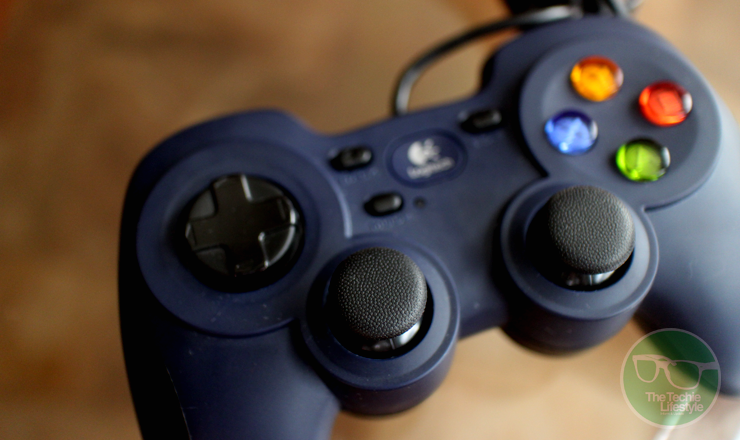

In terms of its form, the F310 resembles that of a PlayStation with these legs that provides comfortable grip to users. At the right the right side of the controller, you’ll find four action buttons (A,B,X,Y) which are reminiscent to those on the Xbox, while on the left you’ll find the 4-switch D-pad.

At the center of the device you’ll find the dual analog sticks as well as four buttons – Back, Start, Mode and a large center button bearing the Logitech logo. A single LED light is found beside the mode button.


Looking at the front of the device, you’ll find the usual shoulder and trigger buttons you’ll find in controllers from Microsoft and Sony. What’s unique with the F310 though is that when you flip the device you’ll find a small switch which allows switch form Xinput and Directinput depending on the game you’re playing.


Logitech was pretty generous when it comes to cabling as the F310’s USB cable stretches 1.8 meters.

USER EXPERIENCE

In general, the Logitech F310 fulfills what it promises to consumers. The gamepad is robust and works well with a lot of games without breaking your budget. However, it’s good to note that it does come with a few shortcomings.

For starters, unlike the controllers for the Xbox and PlayStation, there’s no unified tactile experience with the F310. What I mean is that the tactile feedback on some of the buttons are quite different from the rest of the controls of the gamepad which at times can feel weird.


A good example of this issue is with the shoulder and trigger buttons. While the shoulder buttons provide a “clicky” feedback, the trigger buttons on the F310 provide more resistance which you could either love or hate. The D-pad also feels weird, because it’s a bit loose compared to what you’ll find on other controllers. I guess this is because of the mechanism of the 4-switch D-pad.

When it comes to ease in use, the F310’s design provides for a comfortable experience even after extended use. The legs (or handles) of the device have this nice curves that follow the shape of your hands when you’re holding it.


The Logitech F310 is specifically designed for PC gamers who are fond of fighting and racing game genres. However, the F310 can also be used in other devices. In fact, Logitech’s website specifically markets this gamepad for Android TV devices.

Moreover, doing some research, you might find out that this device can also be used on the Xbox and PlayStation. Unfortunately, suing the F310 on your console isn’t as intuitive as when used on the PC. I asked my friends to test the device on their PS4s and on our office’s Xbox 360, and none of them was able to get the gamepad working.

FINAL WORDS

All in all, the Logitech F310 is a solid buy for those looking for a budget-friendly gamepad for playing fighting and racing games on their laptops or PCs.

I really like that Logitech designed the F310 after the PlayStation’s controller incorporating some of the Xbox’s flare. In general, using the gamepad is a breeze, especially on the PC where the F310 shines with its plug-and-play functionality.

On the down side, the Logitech F310 struggles in providing a unified tactile experience to the consumer as the feedback from its buttons vary widely.  The gamepad also gets demerits when it comes to cross-device compatibility as it isn’t as easy to use on other devices.


For just $25 (or around Php 1,200) is definitely something I’d recommend to users who are looking for a reliable controller from a reputable brand.

Connect with The Techie Lifestyle on your favorite social networking sites

Twitter Facebook Subscribe to RSS Feeds Google Plus Follow via Email

Bluetooth speakers have become such a hit these days especially with the rise of music and video streaming apps. Indeed, the ability to wirelessly control and project your music library has in a way created a niche that a lot of audio equipment manufacturers are trying to get a piece of.


Harman Kardon, being one of the most established brands in the audio equipment industry has of course created several versions of the Bluetooth speaker. In fact, the company already has several iterations of the wireless speaker from high performance wireless speaker systems to portable versions that double as power banks.

Over the past couple of weeks, I got the chance to test drive one of Harman Kardon’s portable Bluetooth speakers – the Esquire 2 and put it to its paces. If you’re on the hunt for a wireless speaker but want to distinguish yourself from the rest of the crowd, read on and check whether the Esquire 2 is the best product for you.

WHAT’S IN THE BOX

For the hefty price tag it commands, the box of the Esquire 2 is a bit uninspiring, well at least on the outside. The exterior of the box is clad with various signages and images of the device as well as text description of its features in different languages.


Opening the box, involves lifting two flaps of cardboard. The insides of the box is padded with black high-density foam, which cradles all the contents of the box in a secure manner. Apart from the Esquire 2, the box also contains a micro USB charging cable (no wall adapter) and the usual mix of paper work including a quick start guide and important safety instructions booklet.

DESIGN AND CONSTRUCTION

Harman Kardon has long been known for producing top notch audio products with premium build materials and design. The Esquire 2 is definitely not exempted from this tradition. The speaker is bound by a metal band with chamfered edges both at the front and at the back. The back panel of the Esquire 2 seems to be made from leather while the speaker grill at the front is made from high-grade plastic.


There’s also a chrome-plated kickstand at the back with a strip of rubber at one end to prevent the stand from slipping. Correspondingly, there are two rubber feet located at the bottom portion of the speaker to keep the speaker in place when on a flat surface.

The Esquire 2 also features several LED lights that work as indicator lights for various statuses. On one hand, there are five LED lights at the left side of the speaker which shows the battery level of the Esquire 2. There’s also a multi-color LED light at the front of the device which shows a different color depending on its status – white when the device is turned on, blue when the speaker is paired or is pairing with another device, green when a call is active or is ringing and red when the call is on mute.


Looking at the top of the device, you’ll find a plethora of buttons that of course controls various functions of the speaker. At the far left, there are four buttons: power, Bluetooth, the call answer and mute button; while a volume rocker sits at the opposite end.


The right side of the device is where you’ll find its trio of ports, namely the charging port, an aux port and finally a USB port as the Esquire 2 also doubles as a portable power bank that can charge other devices. Finally, the Esquire speakers also features four microphones that are placed at each corner at the front of the speaker making it a great device for office conference rooms.


Overall, the design and construction of the Esquire 2 is mostly intended for those with sophisticated tastes. The device fits well in specific spaces like conference rooms or formal living rooms and probably is suitable for company execs and professionals who are into high-end audio equipment, which is essentially Harman Kardon’s target market.  

USER EXPERIENCE & SOUND QUALITY

Just like any other Bluetooth speaker, the Harman Kardon Esquire 2 connects to smart devices without much effort. Once the device is on, a user simply needs to press the pairing button at the top and use the Bluetooth settings in their phone or tablet to pair with the speaker.


Once paired, the Esquire 2 becomes an extension of the device churning out audio for the phone, tablet or laptop. Moreover, since the speaker also comes with four microphones, it also works as an audio input device allowing users to utilize the Esquire 2 when making audio or video calls.

In terms of audio quality, I was pleasantly surprised with the quality of the sound coming out of the Esquire 2. Even when the speaker is on full blast, I didn’t notice that much sound distortion compared to other speakers. Moreover, in contrast to other Bluetooth speakers in the market, the Esquire 2 focuses on delivering crisp audio instead of the usual bass boost.


Speaking of audio levels, the Esquire 2 is able to generate a considerable amount of boom. I tried cranking the volume up to the maximum level and my phone’s audio meter registered over 60dB. It’s worth noting that even at this level, the sound coming from the speakers are still clear and crisp with minimal quality loss.

EXTRA FEATURES AND BATTERY LIFE

Apart from playing tunes and acting as a conference room gadget, the Esquire 2 is also a portable power source. A USB port is located at the right side of the speakers which users can use to top-off their smartphone or tablet.


Theoretically, the 3200mAh battery on the device is enough to fully charge a decent-size smartphone, however, this theory is doesn’t really work well in practice since the sound drivers also draw power from this battery. It was quite difficult to accurately test how well the speaker was at charging other devices but I wouldn’t recommend users relying on this device in a power emergency.

Finally, when it comes to longevity, the Esquire 2 was able to last for days on moderate use. According to the package, the device is able to go for 8 hours of continuous playback, which is quite respectable especially for a Bluetooth device.


As for charging time, one can expect the device to be fully charged in less than two hours depending on the type of charger they are using.

FINAL WORDS

To sum it all up, I find the Harman Kardon Esquire 2, quite an enjoyable device to listen to. I really like the design language that the company used in the construction of this product. In terms of looks and appeal, I can clearly see this device harmoniously living with other premium gadgets in an executive’s office.


I also like that it has the ability to charge other devices. Although its ability to share power to other devices is quite useful, it doesn’t make it a replacement for your full-fledged power banks. Nonetheless, it’s a feature that’s quite welcome.

The quad-microphone feature is also nifty, although I think it’s a component that a lot of people will take advantage of (especially here in the Philippines). But then again, it’s nice that Harman Kardon included it.

For around Php10,995 (or around $199.95 on Harman Kardon’s US website), the Harman Kardon Esquire 2 is not a cheap buy. This particular model of Bluetooth speakers will most likely be owned by a high-level executive, who takes this device in his “jetsetter” lifestyle taking conference calls in different parts of the world.

As for the rest of us, it’s something we’d like to include in our dream board of gadgets we want to own, when we make it to the big league or if we ever won the lottery. It is for this reason that I highly recommend the Esquire 2 – that is, if you can afford it.  


If you want a hands-on experience with the Harman Kardon Esquire 2, you can visit any of the following JBL/Harman Kardon/A.Refinery stores:
  • JBL Sound Gallery – B3 Bonifacio High Street (beside TGIFriday’s and Happy Lemon), 799-9344
  • JBL Acoustical Space – 4th Floor SM Megamall Cyberzone, 919-6012
  • JBL Digital Dreams – 4th Floor SM North EDSA Annex, 738-2554
  • JBL / Harman Kardon Level 3 Mindanao Wing TriNoma
  • JBL / Harman Kardon 3rd Floor Fairview Terraces
  • A.Refinery Level 2, UP Town Center
  • A.Refinery Level 3, Ayala Center Cebu
  • A. Refinery Level 2, Abreza Ayala Mall

Connect with The Techie Lifestyle on your favorite social networking sites

Twitter Facebook Subscribe to RSS Feeds Google Plus Follow via Email

When it comes to our gadgets, especially those which we paid a hefty price for, having the best bit of protection is almost mandatory in order to protect your investment. For expensive laptops, like those from Apple’s Mac line or even Windows-powered devices like Dell’s XPS devices or Asus’ Zenbook line, the best kind of protection you can get would be in the form of sleeves and cases.


Looking at the market for third party laptop sleeves, you’d find that the choices can be a bit overwhelming with options coming from various price points. One of the brands at the mid to higher end spectrum of case and sleeve makers is Booq offering cases in the $30 to $40 range.

A couple of weeks ago, I got my hands on three of Booq’s sleeves namely the Mamba, the Taipan spacesuit and the Viper. After using them for several days, here are my initial impressions about the three sleeves as well as recommendations on what kind of demographic each style is designed for.

Booq Taipan Spacesuit

Of the three laptop sleeves I got, the Taipan Spacesuit is probably what I’d recommend to female users. The Taipan Spacesuit belongs to Booq’s fabric collection and is made from neoprene that features a honeycomb pattern. The specific model I got was designed to fit perfectly for the 12-inch MacBook, though it would still fit smaller 10 or 11-inch netbooks.


The sleeve is well-padded and features a type of fabric similar to those used in plush toys. The Taipan Spacesuit also comes with interchangeable leather zipper pullers for those who want a little bit of color. This sleeve also comes with padded interior zipper guards that provide added protection and prevents the zipper mechanism from scratching the device inside.

Price: $40 (~Php2,300)

Booq Viber Case 13

On the other end of the spectrum, the Booq Viper Case 13 is something I would recommend to people who live an active lifestyle but still want to bring their laptop with them in their adventures.


In contrast to the Taipan spacesuit, the Viper case sports a more rugged construction with its semi-rigid molded body made from ballistic nylon. The interior material is also different from the Taipan as this one uses Airmesh material that should provide ample protection even when on the move.


The Viper case is also water-resistant (or at least the ballistic nylon exterior) and features genuine YKK metal zipper. The review unit I got was specifically designed for the 13-inch MacBook Pro or MacBook Air but it should still fit other 13-inch laptops nicely.

Price: $45 (~Php2,490)

Booq Mamba Sleeve 13

Somewhere in between the Taipan and the Viper is the Mamba Sleeve 13. Just like the Taipan spacesuit, the Mamba is also part of Booq’s Fibre collection, which means it features the same soft plush lining that provides protection to your laptop.


The exterior of the sleeve is made from 100% natural fiber, which has a texture similar to linen and provides a simple and underrated design. Just like the Viper, this sleeve also comes with genuine YKK high-quality zipper that ensures durability from wear and tear.

Although not as tough as the Viper Case, the Mamba provides adequate protection without the bulk. The specific model I got was meant for the 13-inch MacBook Air though I tried using it on my Acer Aspire V13 and surprisingly it fits like a glove.

Price: $40 (Php2,300)

NOTE: All models come in 11, 12, 13 and 15-inch variants. For those interested in getting any of the three sleeves and cases above, you can check them out on A. Refinery stores in the following location:
  • A.Refinery Level 2, UP Town Center
  • A.Refinery Level 3, Ayala Center Cebu
  • A. Refinery Level 2, Abreza Ayala Mall

Connect with The Techie Lifestyle on your favorite social networking sites

Twitter Facebook Subscribe to RSS Feeds Google Plus Follow via Email

Do you spend hours in front of a monitor or a TV? Do you feel discomfort in your eyes after long hours of staring into your computer monitor or playing computer games? If so, you might be suffering from digital eye strain.


Digital eye strain is the discomfort experienced by people after two or more hours in front of a digital screen. The discomfort is caused by long exposure to the blue-violet light (with wavelengths ranging from 380 to 500 nm), which are harmful to the retinas.

While it isn’t really an option to reduce the amount of time we look at our screens, especially for people whose jobs require them to look at digital displays throughout the day, there are ways to reduce the amount of blue light our eyes get exposed to, including the use of special lenses that deflect blue light.

Singaporean brand Energeyes is a brand that offers an over the counter digital glasses that promises an affordable eye protection to consumers. We got our hands on a pair of Energeyes glasses and took it for a spin to test if it really helps in reducing digital eye strain.

WHAT’S IN THE BOX

Compared to glasses from your optometrist, the Energeyes digital glasses come in a very modest package. The product is neatly packaged in a triangular box made from folded transparent plastic.


The box has descriptive product specs printed on all sides and comes with a plastic cut-out that holds the glasses in place. The product doesn’t come with any paper work or even care instructions. Also, unlike other glasses, there’s no protective case or a cleaning cloth with the package.

DESIGN AND CONSTRUCTION

Whether your purpose of getting digital glasses is for preventive measures or as advised by a physician, it can’t be denied that glasses is also a form of fashion accessory. Therefore, design is always an important consideration when getting any form of eye wear.


Fortunately, Energeyes offers a wide variety of color and style combinations to fit anyone’s taste and face shape.

A large part of the product is made from plastic. The glasses’ frame can come in two different styles and a variety of colors, giving users the flexibility to choose the style that fits their personality. The glasses’ hinges have a metallic finish though we’re not sure if they’re made from real metal.


Judging on the overall weight of the product, I’m assuming even the lenses are made from plastic. The inner side of the lens looks very typical but the outer side appears to have a blue tint. The right side of the band bears the company logo while the left band is where the product code is printed.

USER EXPERIENCE

I’ve had the Energeyes glasses for a couple of weeks and during my time with the product, I noticed that it did indeed reduce the strain I felt in my eyes. I used to squint a lot whenever I stare into my laptop or monitor for extended periods of time and I noticed that there was a significant change after using the glasses.


Moreover, I also noticed that the glasses do improve contrast of images displayed on the screen. This is especially true for blacks and other dark colors which appear darker when viewed with the glasses.

As I mentioned earlier, the lens seems to be made from plastic and because of this, they’re a bit of a fingerprint magnet. So, you better have a cleaning cloth handy to clean the glasses before use. And while we’re in the topic of product care, I’d recommend getting a glass case to protect the Energeyes when putting it inside your bag.


Energeyes doesn’t offer any sizes for the glasses, so users better make sure that they fit the product before buying. Furthermore, the product doesn’t work for people who use prescription glasses as Energeyes don’t provide any form of visual correction for people with vision problems.

FINAL WORDS

When all things are said, the Energeyes digital glasses offers exactly what it promises to do. During my time with the product, there was really a noticeable improvement on the reduction of discomfort I experience when using digital screens for long periods of time.

I really like that Energeyes has provided users with a lot of option when it comes to the style and color so I can pick the glasses that fit my taste. However, I wish that the brand can extend this flexibility in the materials they use in constructing the glasses (like a metal version, even if it jacks the price up a little).

Having a case and cleaning cloth bundled with the product would also be nice, since it is almost imperative that the glasses have these accessories so it could last longer when it’s subjected to everyday use.


For those interested in getting a pair of Energeyes glasses, the product is available on the company’s website or from Ekotek kiosks nationwide for Php1,999 or around $50.

UPDATE: So it turns out the Energeyes package does come with some sort of case. Tucked underneath the triangular box of the glasses is a microfiber pouch that doubles as a cleaning cloth.

Connect with The Techie Lifestyle on your favorite social networking sites

Twitter Facebook Subscribe to RSS Feeds Google Plus Follow via Email
2013-2015 © The Techie Lifestyle
Planer theme
Powered by Jasper Roberts Consulting - Widget